Import a Divi 5 file through the screen that matches how it was exported. A page layout can be a Visual Builder export, a saved section can be a Divi Library export, and a shared header can be packaged as either a saved section or a Theme Builder template. The file extension alone cannot tell you which one you have.
Match each file to its import screen
| Download contains | Open this screen | Check after importing |
|---|---|---|
| Visual Builder portability export | Open the target page in the Visual Builder and look for Portability. | Use a draft page and check the option that controls whether existing page content is replaced. |
| Divi Library collection or saved item export | Divi → Divi Library → Import & Export. | Find the saved item, then add it in the Builder at the right level: page, section, row, or module. |
| Theme Builder template export | Divi → Theme Builder → Portability. | Check the assignments, including any global header or footer. Save Theme Builder changes only after reviewing them. |
| Theme Options export | Divi → Theme Options → Portability. | Compare the incoming site settings with what the staging site already uses. |
| Theme Customizer export | Divi → Theme Customizer → Portability. | Review the imported customizer settings on a staging copy. |
| Installable child theme ZIP | Appearance → Themes → Add New → Upload Theme. | Confirm the Divi parent theme is installed. Follow the child theme’s separate demo import instructions if included. |
Example: importing a saved testimonial section
Download and unzip the free Divi 5 testimonial carousel. Its JSON is a saved section. Import that file through the Divi Library, then open a page in the Visual Builder and add the carousel as a saved section. The existing page can keep its other sections.
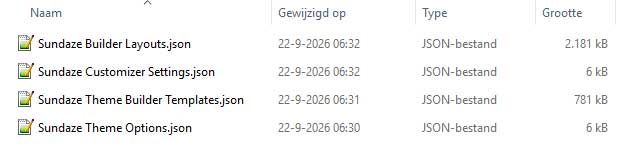
A complete site pack can contain several different exports. The Sundaze setup guide lists separate files for the Divi Library, Theme Builder, Theme Options, and Theme Customizer. Use the setup instructions for your exact download when assigning each file to a destination.
What to check if a Divi 5 import does not work
- “This file should not be imported in this context.” Recheck the export destination in the product instructions. Imports from different Divi screens can all use JSON.
- WordPress will not install the ZIP. If the download is an outer package, unzip it first and look for the installable theme ZIP inside. Leave the installable ZIP compressed.
- The section is missing in the Builder. Check the Divi Library for the saved item and use the option to add that item type. A saved section appears in a different place from a full page layout.
- A layout loads but looks incomplete. Check the Divi version, required plugins, and any instructions for adding images or assigning templates.
Protect the design you already have
Start on a draft page for a page or section import. Use a staging copy for theme activation, settings imports, or a pack that brings in global templates. Export the templates and settings you plan to replace before importing. Afterward, check an existing page and one page that should receive the new template.
For the current builder controls, see Elegant Themes’ Divi 5 Visual Builder guide and Theme Builder template guide.