

To remove “Designed by Elegant Themes | Powered by WordPress” from the classic default footer of your Divi website, use the footer credit controls in the Theme Customizer.
You can hide the credits or replace them with your own text. There is no need to edit the theme’s PHP files for this method.
Go to Divi > Theme Customizer > Footer > Bottom Bar
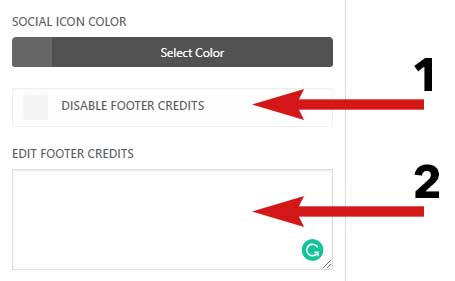
Check Disable Footer Credits (1) to hide the text, or enter your replacement in Edit Footer Credits (2). Publish the Customizer changes, then check the public footer.
Credits still visible, or Footer settings missing? Check Divi > Theme Builder for a footer assigned to that page. A custom footer’s credit text is edited inside its layout, often in a Text module. Save the layout and the Theme Builder changes. A global-footer change affects every page using that footer.
For alignment in the classic default footer, see Center Divi Footer Credits. In a custom footer, use the relevant Text module’s alignment controls.
If you really want to make a special footer I recommend to create a custom Divi footer for that you can follow this tutorial how to build a custom Divi footer.