
If a Divi 5 page shows the wrong header, footer, or body, check the Theme Builder template assigned to that exact URL. A more specific assignment can take precedence over a general one, and a template can exclude a page or hide one of its parts.
Start with the exact URL
Open the page as a visitor and note which part looks wrong. Then identify what kind of URL you opened. A single post in the Guides category and the Guides category archive are different pages. A rule for posts in Guides applies to those posts, while a category archive rule applies to the listing.
| You opened | Look for an assignment covering |
|---|---|
| One ordinary page | All Pages or that specific page |
| A single blog post | All Posts, the specific post, or posts in the category |
| A blog category archive | All category archives or that category archive |
| A product category archive | WooCommerce product category pages or the specific product category |
Check assignments, exclusions, and template parts
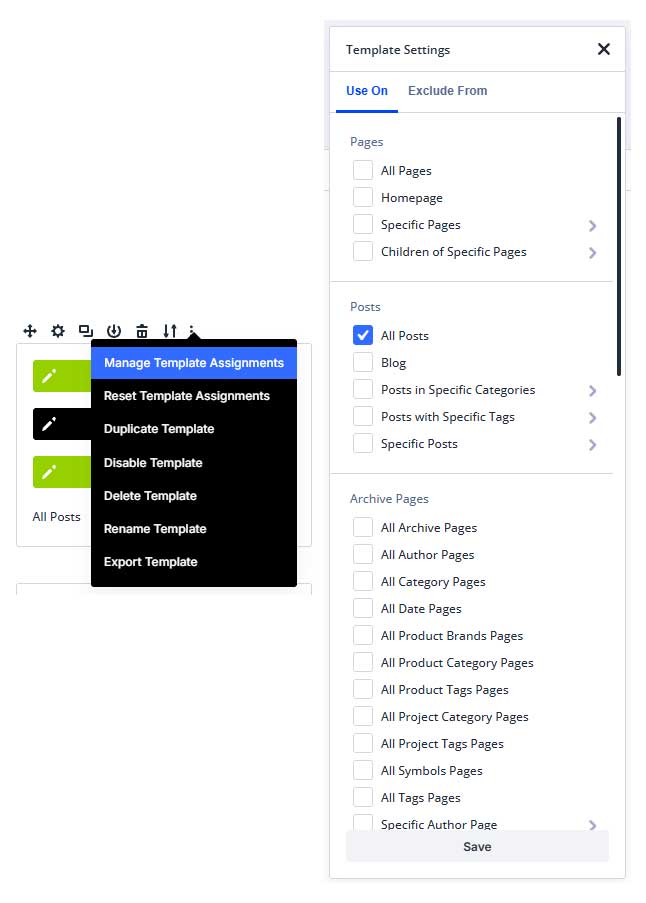
- Open Divi → Theme Builder. Find the template you expected to apply and open its assignment settings.
- Check the include rules against the exact URL type. Then check the exclusions on that template.
- Look for a second template with a narrower assignment. For example, posts in Guides can use their own template while other posts use the All Posts template.
- Check whether the template is enabled and whether its header, body, or footer is global, custom, or hidden. If a single post’s actual article text is missing, check the body layout for the Post Content module.
- Save any changes in the layout editor and on the Theme Builder screen. Compare the affected URL with an unaffected URL in a private browser window. If saved changes still differ between the builder and front end, check the relevant cache.
Example: a different header on one service page
The global header appears on every page except Roof Repairs. Open the template assigned specifically to that service page. If it has its own custom header, you can update that header or make the template use the global header if that is the intended design. Check a second service page afterward to confirm its header stayed correct.
If the problem started after importing a template, compare the imported assignments to the templates already on the site. A backup export makes that comparison easier on staging. See Elegant Themes’ Divi 5 Theme Builder guide for assignment and template part controls.